
Your light switch shouldn't be a phone-grab away.
Lumi puts your Yandex smart-home lamps one click from the Windows tray.
Free · open-source · one file, nothing to install
The problem
Your lamps are smart
But from a computer, the road to them isn't.
Unlock it, find the smart-home app, wait for it to load, tap the lamp. Four steps for a light switch.
The voice assistant works — until it's 3 a.m. and you'd rather not talk to a speaker.
The web dashboard of a smart-home cloud is nobody's idea of quick.
Your hands are already on the keyboard. The lamp should be one motion away — like a real switch.
How it works
Lumi lives in your tray.
Left click toggles your pinned lamp. Right click opens every lamp you own.
One click, light toggled
Left-click the tray icon — the pinned lamp flips instantly.
Every lamp in one panel
Right-click shows them all — toggle any lamp in the house.
Pin your main lamp
The ☆ puts any lamp on the left click. Saved across restarts.
Brightness on a drag
Every lamp has a track — drag it, release, done.
One self-contained .exe
Nothing to install. Autostart is a toggle in the settings.
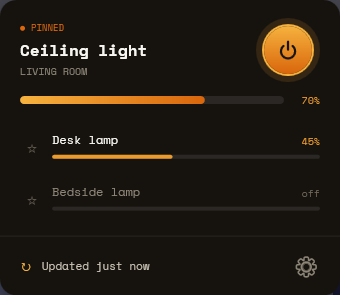
The panel — a pinned lamp, the rest below, brightness everywhere
● States are fetched when the panel opens — no background polling, no idle traffic, and the tray icon stays quiet.
How it compares
Lumi vs. the detours
| Lumi | Phone app | Voice assistant | Web dashboard | |
|---|---|---|---|---|
| One click from where you already are | ✓ | ✕ | ~ | ✕ |
| Silent — no talking out loud | ✓ | ✓ | ✕ | ✓ |
| Hands stay on the keyboard | ✓ | ✕ | ✓ | ~ |
| Purpose-built, no bloat | ✓ | ✕ | ~ | ✕ |
✓ yes · ~ partial · ✕ no
Open by default
Free, open, and built in the open
Use it, fork it, ship it. No strings.
Every line is public — read it before you run it.
Your Yandex OAuth token is stored on your machine and sent only to the Yandex IoT API.
A real Windows app in C#/.NET — nothing extra to install to make it run.